How to Install TiviMate 8K on Firestick (2026 Complete Setup Guide)
Install TiviMate 8K on Firestick with Downloader code 5811661, add your playlist with Xtream Codes, load the TV guide and fix common problems. Step by step.
Read guideWe use a few cookies
Necessary ones keep you signed in. Analytics and marketing are optional and off until you say otherwise. Cookie policy.
Nothing optional has been set yet. Choose what you are happy with — you can change it any time from the footer.
Strictly necessary
Sign-in, your basket, security and load balancing. The site cannot work without these, so there is nothing to turn off.
Analytics
Anonymous page and referrer counts on the public marketing pages, so we know which guides are worth writing. Never used inside your account or the admin panel.
Marketing
Measures whether an advert led to a subscription. Off unless you turn it on — nothing is set before you choose.
Full detail in our cookie policy.
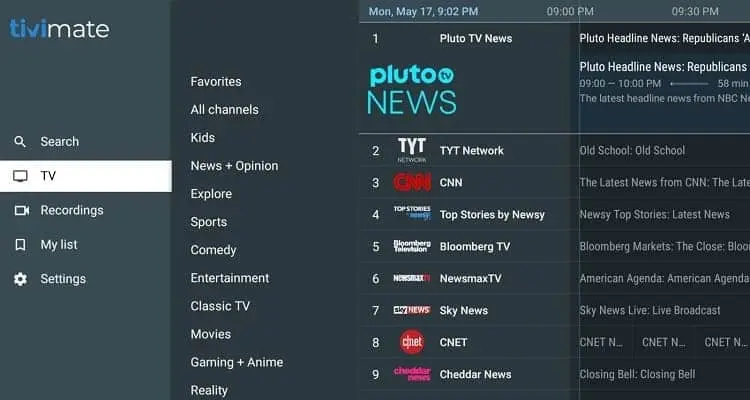
TiviMate is widely regarded as the benchmark IPTV player for big-screen television navigation. Designed specifically for Amazon Fire TV, Firestick, and Android TV devices, it transforms compatible IPTV playlists into a modern, broadcast-grade television experience with responsive EPG guides and remote-friendly controls.
TiviMate electronic programme guide (EPG) layout with live preview on Fire TV
Player Architecture
Many viewers new to IPTV assume that downloading an app immediately gives them access to live TV channels. Understanding the distinction between an IPTV player application and an IPTV subscription provider is key to a smooth setup.
TiviMate is purely the software interface installed on your streaming hardware. Its job is to interpret stream URLs, organize channels into sensible categories, format the TV guide timeline, and decode digital audio and video feeds. It does not provide content, maintain streaming servers, or control channel availability.
CompassIPTV is the subscription service that delivers the digital broadcast streams. When you subscribe or request a free trial, you receive your Xtream Codes connection parameters (Server URL, Username, and Password). Entering these into TiviMate populates the player with live channels, movies, series, and EPG schedules.
Capabilities
Unlike touchscreen-first mobile players ported awkwardly to TVs, TiviMate was engineered from the ground up for living room screens and remote control navigation.
Smooth grid navigation with customizable past/future time windows, channel logos, programme descriptions, and automatic background guide updates.
Manage backup playlists or regional accounts in one unified application, with the ability to switch or merge channels across subscriptions.
Group your most-watched sports, documentary, and entertainment channels into a custom favourites folder, and hide categories you never watch.
Rewind and catch up on missed broadcasts directly from the EPG timeline when enabled on supported channels by your service provider.
Record live programmes to internal storage, connected USB drives, or local network attached storage (SMB) on Android TV and Firestick devices.
Watch 2, 3, or up to 4 live streams concurrently on one television screen — ideal for keeping tabs on multiple concurrent live sports events.
Instantly search channels, live events, movies, and series by title across your entire playlist without scrolling through long channel menus.
Lock adult, international, or specific channel categories behind a custom four-digit master PIN code to protect younger viewers in the home.
Take advantage of dedicated GPU decoders in Fire TV 4K Max and modern Android TV chips for buttery-smooth 50/60 fps sports playback.
Hardware Guide
TiviMate is engineered exclusively for TV-style Android operating systems operated with a physical remote control. Here is where it works best.
Recommended Platform
Fully compatible with Fire TV Stick HD, Fire TV Stick 4K, 4K Max, and Fire TV Cube. The Fire TV 4K Max provides exceptional responsiveness with Wi-Fi 6 connectivity.
Check our dedicated IPTV Firestick UK page for device benchmarks.
Native Google Play App
Works natively on certified Android TV / Google TV smart sets (Sony, Philips, TCL) and streaming dongles like Chromecast with Google TV.
Direct install from Google Play Store with automated background updates.
Peak Performance
Nvidia Shield TV and Shield TV Pro represent the most powerful hardware for running TiviMate, delivering instant channel switching and 4-way multiview.
Supports AI 4K upscaling and gigabit Ethernet streaming stability.
Fire TV Installation
Because TiviMate is built for standard Android TV, Amazon does not list it inside the default Amazon Appstore. Fire TV owners install it using the official Downloader utility.
Always use verified developer URLs or official Downloader shortcuts rather than unknown third-party APK aggregator mirrors. Third-party mirrors may distribute modified or outdated packages that can compromise account security or cause playback errors.
Need step-by-step assistance setting up your device? Our team is available 24/7 on WhatsApp.
Visit CompassIPTV Support Center →Unlike Fire TV where manual sideloading is required, genuine Android TV and Google TV devices offer a one-click installation experience directly through the on-device Play Store.
Android TV Setup
If your television runs official Android TV or Google TV (such as Sony Bravia, Philips Ambilight, TCL, or a Chromecast dongle), installing TiviMate takes under two minutes.
Connection Methods
TiviMate supports both Xtream Codes login and M3U playlist URLs. Here is how both methods work and why Xtream Codes is our recommended approach.
Xtream Codes uses an API connection that separates your playlist into Live TV, Movies, and Series while syncing your EPG guide and account expiry automatically.
Server URL: http://your-server-url:port
Username: your-assigned-username
Password: ••••••••
Your unique credentials are provided immediately after signup. Simply copy them into the three respective fields in TiviMate.
An M3U URL is a single web link containing stream pointers for all channels. In TiviMate, you select "M3U Playlist" and enter or paste the entire URL.
Playlist URL: https://server:port/get.php?username=...&password=...&type=m3u_plus
While functional, typing long M3U URLs with a TV remote is tedious. Using Xtream Codes or a remote keyboard app makes input significantly faster.
Feature Comparison
TiviMate can be used completely free of charge, but upgrading to TiviMate Premium unlocks power-user features that make it feel like a high-end commercial television receiver.
| Feature | Free Version | Premium License |
|---|---|---|
| Playlists Allowed | 1 Playlist | Multiple Playlists |
| Electronic Programme Guide (EPG) | Basic single source | Multiple EPG sources & custom assignments |
| Custom Favourites Management | Limited | ✓ Full reordering & groups |
| Catch-Up TV Playback | ✕ Not available | ✓ Supported where available |
| Recording & Schedules | ✕ Not available | ✓ USB / Internal / Network (SMB) |
| Multi-Screen Multiview | ✕ Not available | ✓ Up to 4 live feeds simultaneously |
| Parental PIN Controls | ✕ Not available | ✓ Category & channel lock |
Optimization Guide
Out of the box, TiviMate delivers solid performance. Tweaking these settings ensures your guide stays current and playback remains buffer-free during peak viewing hours.
Under Settings > EPG, set the update interval to 24 hours and enable "Update on app start". This ensures schedule listings and programme details for live sports remain accurate.
Under Settings > Playback, set the Buffer Size to "Normal" or "Large". A larger buffer creates a safety cushion against temporary Wi-Fi jitter on home broadband connections.
In Playlist Settings > Manage Groups, hide foreign language bouquets or content folders you do not watch. Reducing the active channel list accelerates search and saves RAM.
In Playback settings, make sure Video and Audio Decoders are set to "Hardware". Hardware decoding offloads decompression to your device graphics chip, preventing overheating.
If your TV supports it, enable Auto-Frame Rate matching in TiviMate. This matches your display refresh rate to the broadcast stream (50 Hz for UK television, 60 Hz for US sports) for judder-free motion.
Once your favourite channels, EPG offsets, and custom groups are configured, use Settings > General > Backup Data to save a backup file to your storage.
Player Comparison
TiviMate and IPTV Smarters Pro are the two most recognizable IPTV applications in the UK. Choosing between them depends on your viewing habits and device ecosystem.
Best for Big-Screen Television
Best for Multi-Device Users
Troubleshooting
Encountering a playback issue? Here are quick resolutions for the most frequent TiviMate setup and streaming problems.
Subscription Plans
Connect CompassIPTV to TiviMate with instant Xtream Codes activation. Every plan includes full access to live sports, entertainment, movies, and automated EPG guide schedules.
1 Month
£9.99
1 screen
Connections
Simultaneous streams
3 Months
£19.99
£6.66 a month · 1 screen
Connections
Simultaneous streams
6 Months
£36.99
£6.17 a month · 1 screen
Connections
Simultaneous streams
12 Months
Most Popular£49.99
£4.17 a month · most chosen
Connections
Simultaneous streams
24 Months
Best Value£89.99
£3.75 a month · 1 screen
Connections
Simultaneous streams
Test Before Subscribing
Test our stream stability, live channel lineup, and comprehensive EPG guide in TiviMate on your Firestick or Android TV device before purchasing.
Learn more on our IPTV Free Trial UK page.
Frequently Asked Questions
Clear answers to the most common questions regarding TiviMate setup, playlist connections, compatibility, and features.
Have another question? Browse our full Knowledgebase FAQ or contact Support.
Helpful guides
Explore detailed fixes for TiviMate EPG, Firestick playback and account setup issues.
Install TiviMate 8K on Firestick with Downloader code 5811661, add your playlist with Xtream Codes, load the TV guide and fix common problems. Step by step.
Read guideInstall TiviMate on your Firestick, add your IPTV login and get the TV guide working, in plain steps with the settings that matter.
Read guideLearn what makes an IPTV service work well with TiviMate: accurate EPG, stable playback, supported logins, catch-up and clear multi-screen limits.
Read guideTiviMate showing No Information on Firestick? Diagnose EPG sources, playlist mapping, cache, device time and provider-side guide problems safely.
Read guideReady for Better TV?
Experience crystal-clear live television, rich EPG guides, and smooth remote navigation on your Firestick or Android TV.
Need a hand?