How to Install 8K Player VIP on Firestick & Android TV (2026)
Install 8K Player VIP on a Firestick, Fire TV or Android TV with Downloader code 439873, then log in with your CompassIPTV username and password. Step by step, with screenshots.
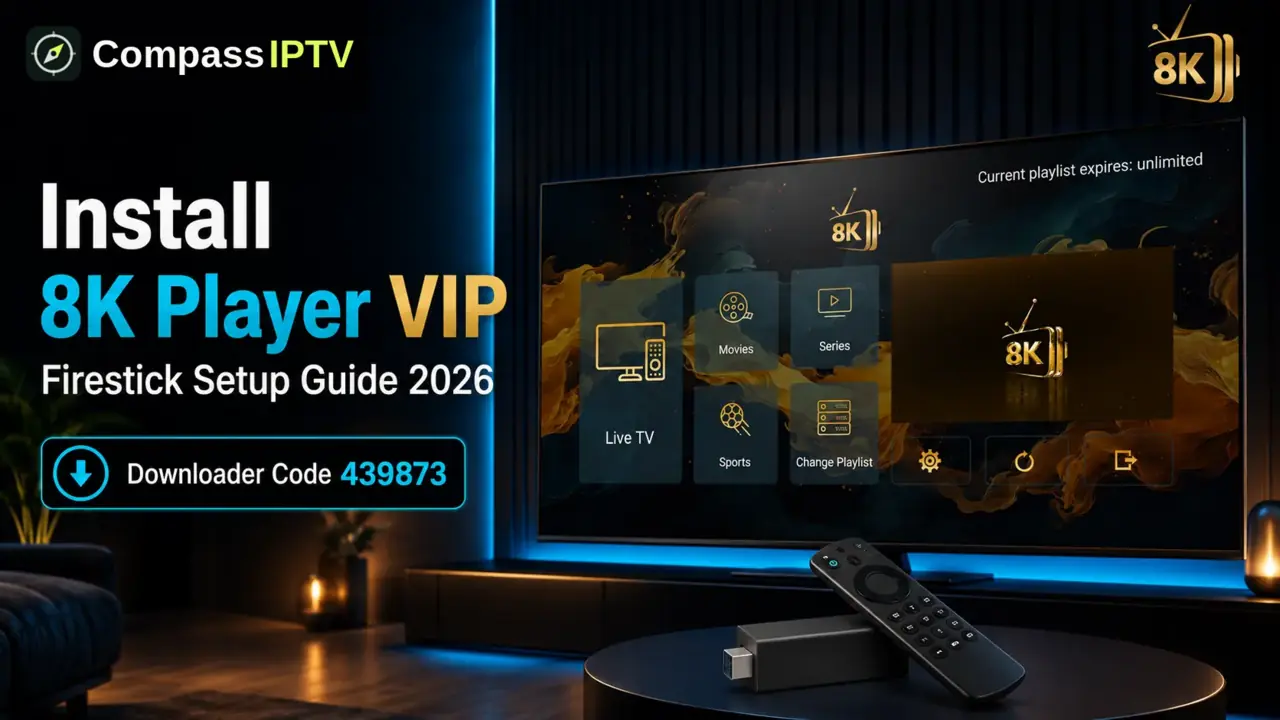
8K Player VIP is the official player app of the IPTV platform CompassIPTV runs on. It is built for the TV screen and the remote: you sign in with just a username and password, and live TV, films, series and sport are ready in a few minutes. This guide shows you how to install it on a Firestick, Fire TV or Android TV and log in.
No IPTV subscription yet? Get CompassIPTV
8K Player VIP needs a service to play. CompassIPTV runs on the same platform as 8K Player VIP, so your login works straight away: live TV, films, series and sport on 1 to 3 screens, with no automatic renewal. Try it free for 24 hours, no payment details needed. Plans from £9.99.
Which devices work with 8K Player VIP?
- Amazon Fire TV Stick, Fire TV Stick Lite, Fire TV Stick 4K and 4K Max
- Amazon Fire TV Cube
- Android TV boxes, including Nvidia Shield
- Chromecast with Google TV and other Google TV devices
- Smart TVs running Android TV or Google TV (Sony, Philips, TCL, Hisense)
The newer Fire TV Stick 4K Select, Fire TV Stick HD (2026) and Fire TV Stick 4K (2026) run Vega OS, which can't install apps from outside the Amazon Appstore, so 8K Player VIP can't be installed on them. Check your model under Settings → My Fire TV → About.
What you need
- A compatible Firestick, Fire TV or Android TV device, connected to the internet.
- The free Downloader app (Step 1 below).
- The 8K Player VIP code: 439873.
- Your CompassIPTV username and password. They are in your "Your subscription is ready" email and in your account. No subscription yet? Start a free 24-hour trial.
- About 10 minutes.
Step 1: Install Downloader
Downloader is a free app that installs other apps from a short code. You only use it once.
- On the Fire TV home screen, open Find (the magnifying glass) and select the Search bar.
- Type Downloader with the on-screen keyboard and pick it from the suggestions.
- Select the orange Downloader app by AFTVnews.
- Select Get or Download and wait a few seconds.
- Select Open. If Downloader asks for access to files, select Allow.
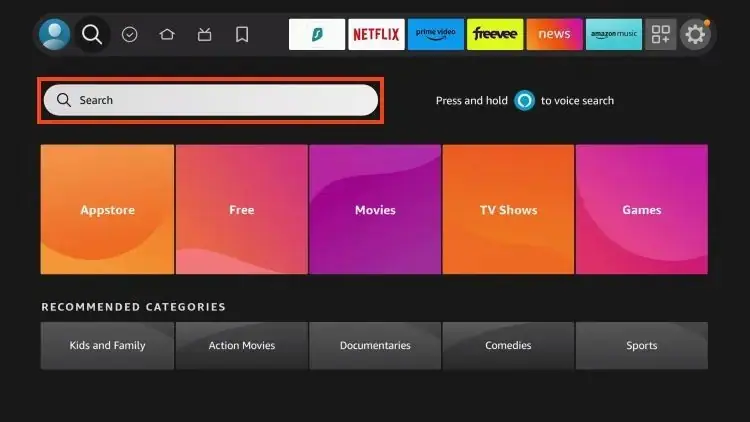
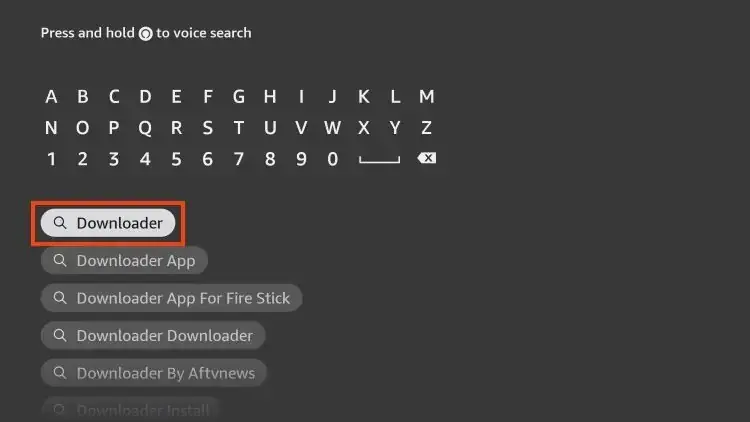
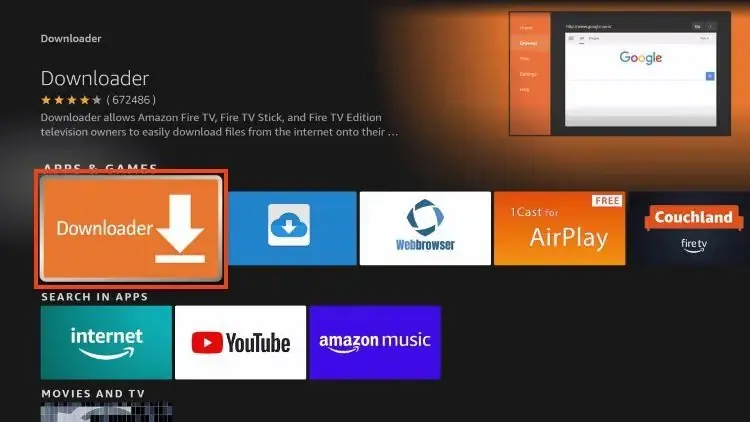
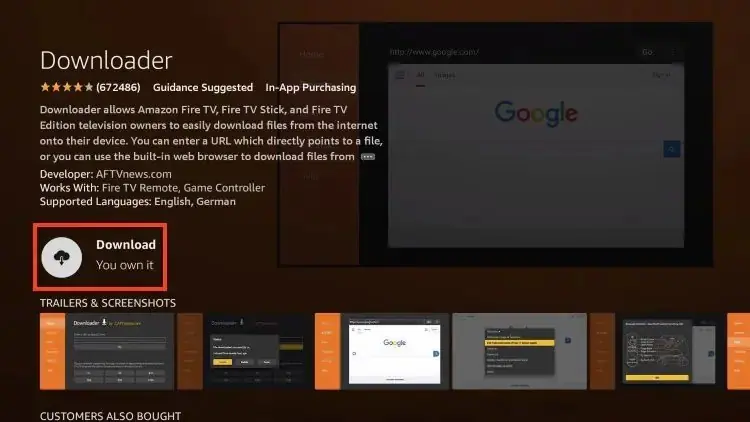
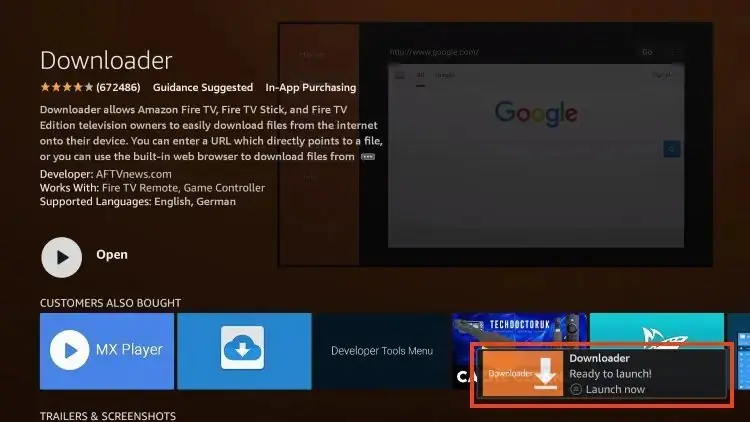
On Android TV or Google TV: install Downloader by AFTVnews from the Google Play Store instead.
Step 2: Allow Downloader to install apps
Fire TV only installs Appstore apps until you allow it. This is a one-time change:
- Go to Settings → My Fire TV → Developer Options.
- Select Install unknown apps.
- Find Downloader and switch it On.
Can't see Developer Options? Go to Settings → My Fire TV → About, highlight your device name and press Select seven times quickly. Press Back and it appears. More help in our Developer Options fix.
On Android TV or Google TV: go to Settings → Apps → Security & restrictions → Unknown sources and switch Downloader On. The menu names vary slightly between brands.
Step 3: Install 8K Player VIP with code 439873
- Open Downloader and select the box on the Home tab.
- Type 439873 and select Go.
- A short page opens first. Wait a few seconds: the download starts on its own. If it doesn't, select the download link on the page.
- When the download finishes, select Install.
- Select Done, then Delete when Downloader offers to remove the file. This frees space and keeps the app installed.
Downloader code not working? See our 7 Downloader fixes.
Step 4: Log in with your CompassIPTV details
Start your free CompassIPTV trial
24 hours free on your own Firestick, with setup help on WhatsApp. Works with 8K Player VIP straight away.
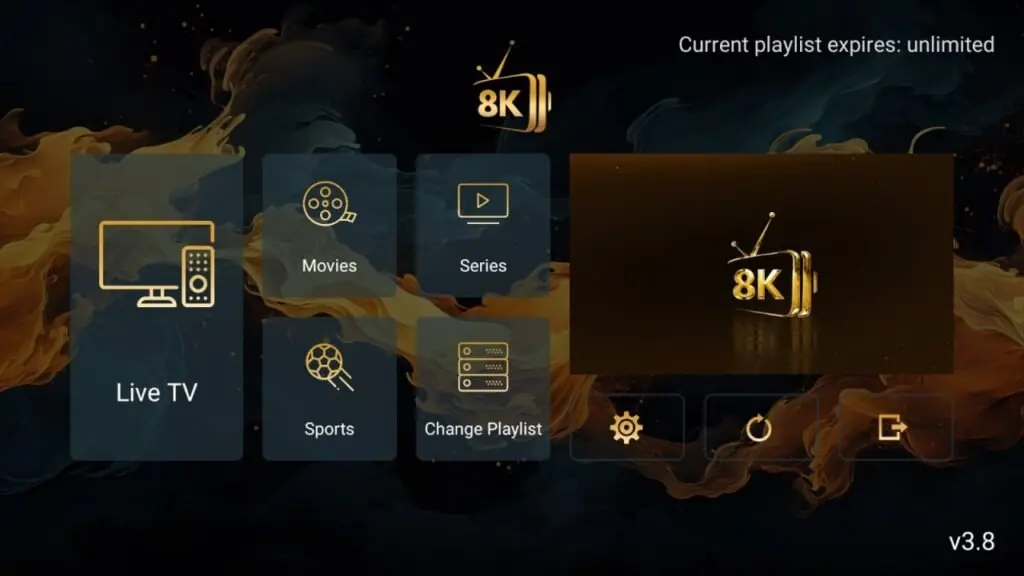
- Open 8K Player VIP from Your Apps & Channels.
- Select the playlist profile shown on the first screen, then choose Edit.
- Enter your CompassIPTV username.
- Enter your CompassIPTV password.
- Check both carefully: they are case-sensitive, and a space at the end stops the login.
- Select Update Playlist and wait. The first load of channels, films and series can take a few minutes.
Your CompassIPTV website password is not your app password. Only use the username and password from your Access Details.
Tip: highlight the app in Your Apps & Channels, press the Menu button (three lines) and choose Move to front, so it's easy to find next time.
Settings worth changing
- Favourites: mark the channels you watch most so they're one click away.
- Update Playlist: run it again if new channels or categories don't appear.
- TV guide: update it if programme times look empty.
- Parental control: set a PIN if children use the TV.
- Connection: use 5 GHz Wi-Fi or an Ethernet adapter for the steadiest picture.
Fixes for common problems
- Code 439873 doesn't open: check the digits, check the internet works in another app, then close and reopen Downloader. If it still fails, message support and we'll send you the link.
- Install is blocked: switch Downloader On under Settings → My Fire TV → Developer Options → Install unknown apps.
- Username or password rejected: retype both exactly, without spaces, and check your subscription or trial is still active in your account.
- Playlist loads but channels won't play: restart the app and the Firestick, try a few channels, and make sure another screen isn't already using a one-connection plan.
- Buffering or freezing: move closer to the router, switch to 5 GHz Wi-Fi or Ethernet, pause downloads, and restart the router. Our buffering guide has more fixes.
- Clearing the app: use Clear cache, not Clear data, unless you're ready to log in again.
Prefer another app?
Your CompassIPTV subscription also works in other players. Compare them in our best IPTV apps for Firestick guide, or follow the TiviMate setup or IBO Player Pro setup.
How to jailbreak a Firestick (2026 safe guide)
New to Downloader? The full guide to allowing app installs safely, with checked codes.
Frequently Asked Questions
What is the 8K Player VIP Downloader code?
The code is 439873. Type it into the box on Downloader's Home tab and select Go.
Is 8K Player VIP free?
Yes, the app is free to install. It is only a player, so you need an active subscription or free trial to watch anything.
Does 8K Player VIP include channels?
No. It shows nothing until you log in with your CompassIPTV username and password.
Why does 8K Player VIP only ask for a username and password?
It is the official app of our IPTV platform, so the server is already set inside the app. You only enter your own login.
Does it work on every Firestick?
It works on Fire OS models such as the Fire TV Stick 4K Max, 4K Plus, Lite and Cube. The Vega OS models (Fire TV Stick 4K Select, and the 2026 Fire TV Stick HD and Fire TV Stick 4K) cannot install it.
Can I use it on more than one TV?
You can install it on several devices. Watching on several screens at the same time needs a plan with that many connections.
Does 8K Player VIP make everything 8K?
No. "8K" is part of the app's name. Picture quality depends on each channel, your TV and your internet speed.
Installed 8K Player VIP? Test it free
Get a free 24-hour CompassIPTV trial, log in to 8K Player VIP and check live TV, films and sport on your own Firestick. No payment details needed.
See our editorial policy for how these guides are prepared and corrected.
Firestick Hub
IPTV for Firestick UK setup and performance guide
Continue with the main setup and compatibility guide for this topic.
Ready to test your IPTV setup?
Try CompassIPTV for 24 hours and check playback, EPG behaviour and device compatibility on your preferred player before choosing a longer plan.
Related Guides & Articles
How to Install TiviMate 8K on Firestick (2026 Complete Setup Guide)
Install TiviMate 8K on Firestick with Downloader code 5811661, add your playlist with Xtream Codes, load the TV guide and fix common problems. Step by step.
Firestick Developer Options Not Showing? How to Fix It (2026)
Developer Options is hidden on newer Firesticks. Here is how to unhide it in seconds, where "Install unknown apps" went, and what to do if your model cannot install apps at all.
Downloader Not Working on Firestick? 7 Fixes That Work (2026)
Code not working, download stuck, "App not installed" or "There was a problem parsing the package"? Here are the causes and the fix for each one.
Best IPTV Apps for Firestick in 2026 (Compared)
TiviMate, IBO Player Pro, IPTV Smarters Pro and more, compared side by side: price, TV guide, ease of use with the remote, and how to install each one.